📅 the calendar
One square per day, darker when you worked more: the gaps in your studying jump out. Tap a day to see its sessions. And 5 days in a row earn you a grace day, which protects your streak if you forget.
exam guide · facts checked on 26 October 2026
The summer 2027 exams start on Monday 10 May. Here are the dates that matter, a revision plan that starts now, and the methods that really work, with Studva to keep you going until results day.
write them down now
A-level papers sit in the same summer series. Each exam board (AQA, Pearson Edexcel, OCR, WJEC Eduqas) publishes its own timetable: check yours for the exact day and session of every paper. Sources: JCQ key dates, AQA and Pearson Edexcel timetables.
know the exam before you revise
Most GCSE and A-level subjects are assessed by two or three written papers, often several days apart. Spread your revision so that no subject is left for the last week.
In most subjects, your grade comes from the papers sat at the end of the course. What you do between now and May counts more than any single lesson.
GCSEs in England are graded from 9 (highest) to 1; A-levels from A* to E. Your offers and next steps depend on them.
Exam boards publish past papers and mark schemes. They are the closest thing to the real exam, and the best training you can get.
from now to the first paper
After each topic, a short summary: key terms, formulas, dates, quotes. Test yourself on it a few days later, book closed.
Fixed slots for each subject, the hardest ones at your best time of day, and one past paper a week.
Full papers in exam conditions, marked with the mark scheme, then a list of what still goes wrong.
A quick look at your summaries, your bag ready, and a real night's sleep: sleep helps lock in what you learned.
explained step by step in the guide
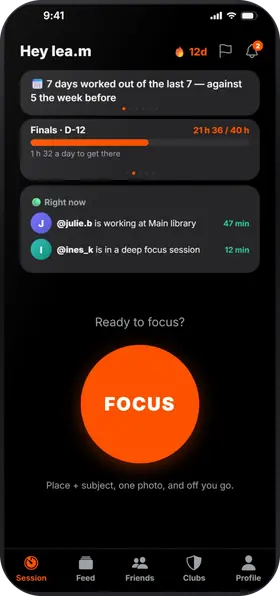
what Studva tracks for you, with nothing to write down
One square per day, darker when you worked more: the gaps in your studying jump out. Tap a day to see its sessions. And 5 days in a row earn you a grace day, which protects your streak if you forget.
Your total work time since day one, milestone after milestone: 1 h, 10 h, 100 h… The app projects the date of the next one at your recent pace, “What if…” shows what 15 more minutes a day would change, and “You last month” compares with your curve from a month ago.
Your time per subject and per place, over 7 days, 8 weeks, the month or the year, with your average per day or per week. You can export everything to CSV.
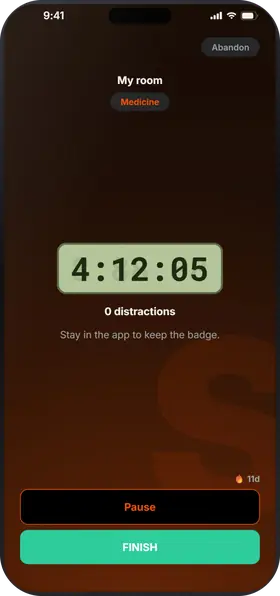
While the timer runs, leaving the app counts as a distraction; locking the screen doesn't. Zero distractions: your session earns the Focus badge and 10% more XP. On iPhone, you can block the apps of your choice during the session.
study with friends, even remotely
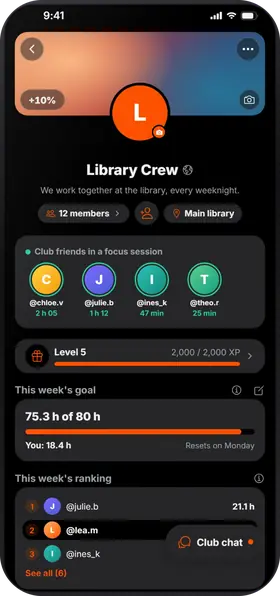
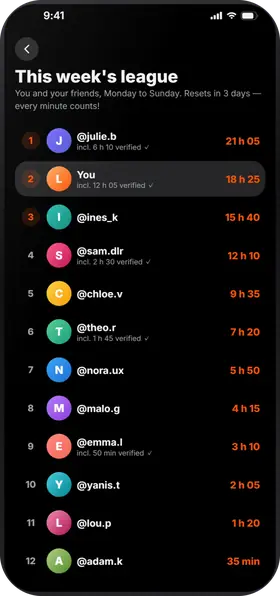
All these methods take consistency. In Studva, your friends see your sessions, the league counts everyone's time from Monday to Sunday, and a club brings your class together around a shared goal.
the short answers
As early as you can, little and often: a short summary after each topic from now, a weekly timetable by February, and timed past papers over the Easter holidays. Regular short sessions beat a last-minute cram.
There is no magic number. In term time, one or two focused hours on school days is a solid base; in the holidays, three to five hours split into blocks with real breaks. In Studva, set a weekly hours goal and add each exam with the time you want to put in: the counter fills up as you work.
Start the timer when you sit down, take a photo at the start and at the end, and your session goes to your friends' feed. Breaks from 5 minutes to 1 hour end on their own, every exit from the app counts as a distraction, and on iPhone you can block distracting apps during the session. Studva is free, with no subscription and no ads.
Studva is free, with no subscription and no ads, on the App Store and Google Play.

On a computer? Open studva.app/dl on your phone.