📅 the calendar
One square per day, darker when you worked more: the gaps in your studying jump out. Tap a day to see its sessions. And 5 days in a row earn you a grace day, which protects your streak if you forget.
comparison · facts checked on 26 October 2026
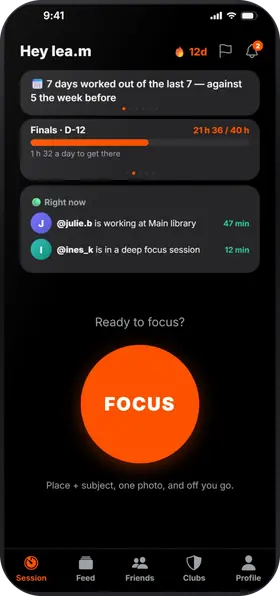
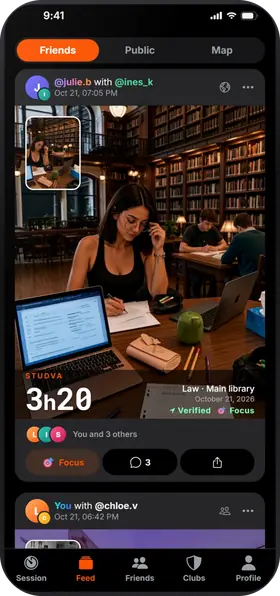
Focusmate puts you on video with a partner, at a booked time, each working on your own task. Studva uses the same lever, the presence of others, but without a camera: your friends see when you work, and you see when they do. Here is what sets them apart, row by row.
both apps, row by row
| Feature | Studva | Focusmate |
|---|---|---|
| Price | Free, no subscription | Free for 3 sessions a week; Plus, unlimited sessions: $8 a month billed yearly or $12 month to month |
| Where | Apps for iPhone and Android | In the browser: no app to install, but a shortcut on the phone's home screen |
| Idea | A timer, whenever you like: your session goes to your friends' feed, with a photo at the start and at the end | Video sessions of 25, 50 or 75 minutes with a partner, booked in advance |
| Camera | No video: a photo at the start and at the end | Camera on for the whole session; microphone as agreed with your partner |
| With whom | Your friends, your class, your club | A partner from the community, a favorite or a friend |
| Breaks | From 5 minutes to 1 hour, they resume on their own; scheduled Pomodoro, 52/17 or 90/20 breaks | The session has a fixed length |
| Tracking | Time per subject and per place, activity calendar, weekly league, CSV export | No details on its pages |
| Where to work | Map of over 500,000 libraries, universities and schools, each with its own ranking | No such feature on its pages |
each with its strengths
what Studva tracks for you, with nothing to write down
One square per day, darker when you worked more: the gaps in your studying jump out. Tap a day to see its sessions. And 5 days in a row earn you a grace day, which protects your streak if you forget.
Your total work time since day one, milestone after milestone: 1 h, 10 h, 100 h… The app projects the date of the next one at your recent pace, “What if…” shows what 15 more minutes a day would change, and “You last month” compares with your curve from a month ago.
Your time per subject and per place, over 7 days, 8 weeks, the month or the year, with your average per day or per week. You can export everything to CSV.
While the timer runs, leaving the app counts as a distraction; locking the screen doesn't. Zero distractions: your session earns the Focus badge and 10% more XP. On iPhone, you can block the apps of your choice during the session.
it depends on what keeps you going
…you need a fixed appointment with someone on video to get started, and a friendly stranger is enough for you.
…you want the same presence effect without a camera or a schedule: your friends in session at the same time, your class in a club, and your time counted in a league.
the short answers
Yes. Studva is free, with no subscription and no ads, and the number of sessions is not limited. Focusmate is free for 3 sessions a week, then paid with its Plus plan (as of 26 October 2026).
No. There is no video: you take a photo at the start and at the end of your session, and your friends see the time spent. On Focusmate, the camera stays on for the whole session.
Yes. On the home screen, “🟢 Right now” shows your friends mid-session: start yours at the same time, even remotely, and tag them on your post (“with @friend”). In a club, propose a work session: it is announced in the chat.
facts checked on 26 October 2026
Official listings and pages checked on 26 October 2026; prices are those shown in the United States and may change. Forest, YPT and Focusmate are trademarks of their respective owners; Studva is not affiliated with any of these apps.
Studva next to well-known apps
Studva is free, with no subscription and no ads, on the App Store and Google Play.

On a computer? Open studva.app/dl on your phone.