📅 the calendar
One square per day, darker when you worked more: the days without work jump out. Tap a day to see its sessions. And 5 days in a row earn you a grace day, which protects your streak if you forget.
remote work guide · facts checked on 29 November 2026
At home, nobody sees whether you are working: that is the freedom of remote work and freelancing, and also what makes focus hard. Here is a daily routine, the methods that work, and how Studva makes your work time visible, to you and to your friends.
Get the app
a frame, even without an office
In a study by Biwer and colleagues (2023), 87 students worked for a day with either fixed breaks, like Pomodoro, or breaks whenever they wanted. With free breaks, sessions and breaks got longer and they felt more tired and distracted. With fixed breaks, they got the same work done in less time.
Without set hours, the day fills up with small urgent things. Book your work blocks like meetings, with the task written in, and protect them.
Working at the same time as someone else, even without talking, helps you start and stay on task. A friend or another freelancer online replaces the office, without the interruptions.
When the sofa, the bed and the kitchen table are all your office, none of them is. A corner kept for work, a café or a library becomes a cue: when you sit there, you work.
the same frame every day
Start with the task that needs the most thinking, before emails and messages.
Group emails, calls and messages in one slot instead of answering as they come.
Lighter tasks in 25-minute blocks, with a real break in between.
A fixed finishing time: note where you stopped, close the laptop, and leave your work spot.
explained step by step in the guide
what Studva tracks for you, with nothing to write down
One square per day, darker when you worked more: the days without work jump out. Tap a day to see its sessions. And 5 days in a row earn you a grace day, which protects your streak if you forget.
Your total work time since day one, milestone after milestone: 1 h, 10 h, 100 h… The app projects the date of the next one at your recent pace, “What if…” shows what 15 more minutes a day would change, and “You last month” compares with your curve from a month ago.
Your time per subject, or per project if you make one for each client, and per place, over 7 days, 8 weeks, the month or the year, with your average per day or per week. You can export everything to CSV.
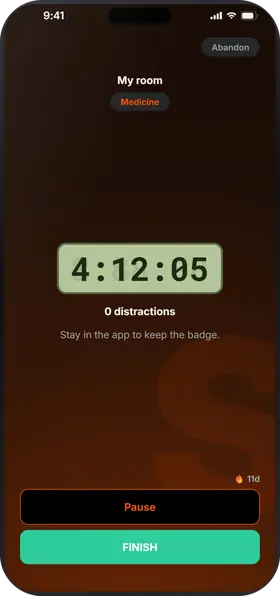
While the timer runs, leaving the app counts as a distraction; locking the screen doesn't. Zero distractions: your session earns the Focus badge and 10% more XP. On iPhone and Android, you can block the apps of your choice during the session.
study with friends, even remotely
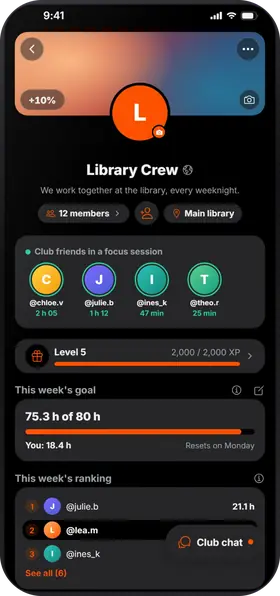
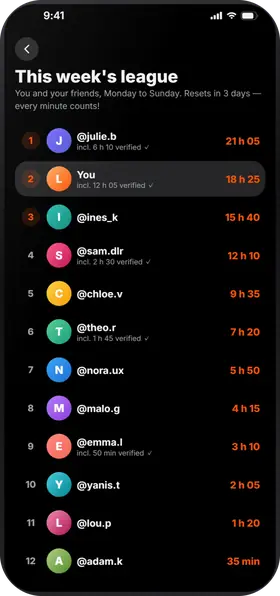
All these methods take consistency. In Studva, your friends see your sessions, the league counts everyone's time from Monday to Sunday, and a club brings your class together around a shared goal.
the short answers
A fixed frame: a start and finish time, the hardest task in the morning, emails grouped in one slot, breaks decided in advance, and your phone out of reach during work blocks.
There is no ideal length for everyone. Fixed breaks help: 25 minutes of work and 5 minutes of rest with Pomodoro, or longer blocks such as 52/17 or 90/20. What matters is deciding on the break before you start.
A fixed finishing time, a corner kept for work, and a small ritual to end the day: note where you stopped, close the laptop, leave the room.
Start the timer for each block, pick a subject for each project or client, and your stats show your time per project, which you can export to CSV. On iPhone and Android, you can block distracting apps during the session, and your friends see when you are working. Studva is free, with no subscription and no ads.
keep going
Studva is free, with no subscription and no ads, on the App Store and Google Play.

On a computer? Open studva.app/dl on your phone.